CONNECT YOUR STORE
A vehicle search engine on your platform.
Choose the integration your website needs and connect your Linautodex account from your store server.
SEARCH AND COMPATIBILITIES
PrestaShop
Module 2.8.25 · Validated in PrestaShop 9.1.5
The customer selects their vehicle and finds the products in your store that you have marked as compatible. You can refine the search by category and subcategory.
Product compatibilities
Add vehicles, copy relationships and use CSV to set up your product catalog.
Proposals from descriptions
The assistant reads the product content and proposes vehicles. Review and confirm before assigning them.
Design and preview
Adjust location, colors, borders, and spacing based on your plan options. View changes before saving.
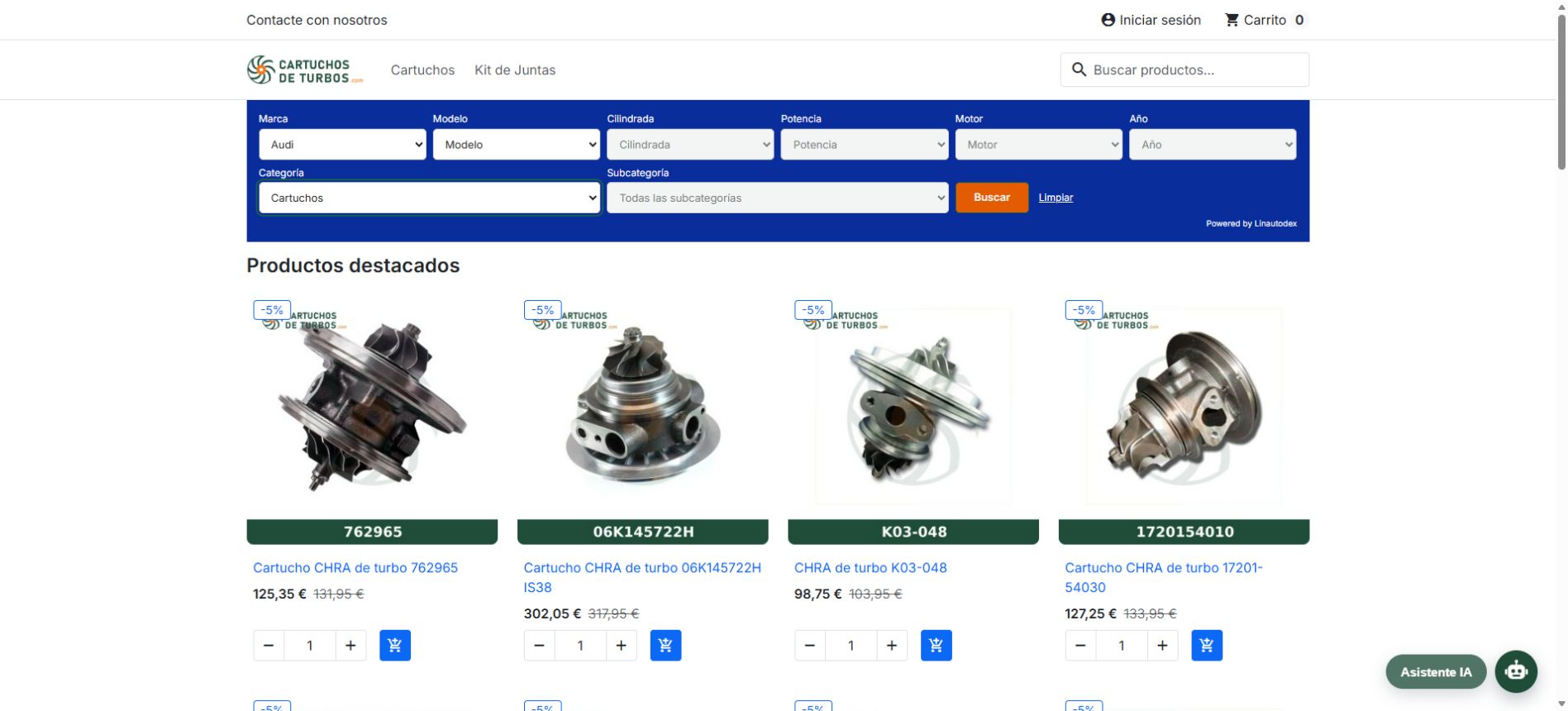
Installation
- Download the ZIP and upload it in Modules → Module Manager → Upload a module.
- Set the Linautodex URL and API key of your account.
- Choose where to display the finder and check how it looks in the preview.
- Assign compatible vehicles to your products and check the filtering.
Requires PrestaShop 9.1.5, PHP 8.1+, cURL, OpenSSL, mbstring, and a Linautodex account. The general catalog remains at Linautodex; Your store retains its compatibilities and private vehicles. Complete instructions are included in the ZIP.
SEARCH AND COMPATIBILITIES
WordPress / WooCommerce
Plugin 2.8.30 · WordPress 7.1.4 / WooCommerce 11.2.1
The customer selects their vehicle and finds the products in your store that you have marked as compatible. You can refine the search by category and subcategory.
Product compatibilities
Add vehicles, copy relationships and use CSV to set up your product catalog.
Proposals from descriptions
The assistant reads the product content and proposes vehicles. Review and confirm before assigning them.
Design and preview
Adjust location, colors, borders, and spacing based on your plan options. View changes before saving.
Incluye revisión completa, decisión única por propuesta, sugerencias de corrección a Linautodex, vehículos privados, reglas por categoría, Litros/cc y potencia en CV/kW. Puedes insertar el buscador con shortcode, bloque, widget o las ubicaciones automáticas del tema.
Installation and requirements
- Upload the ZIP from Plugins → Add plugin → Upload plugin.
- Activa WooCommerce y Linautodex. Abre Linautodex en el menú de WordPress y guarda la URL y tu clave API.
- Elige las ubicaciones o añade
[linautodex]a una página. También se conserva[linautodex_finder]. - Gestiona las compatibilidades en Datos del producto → Vehículos compatibles.
Requiere WordPress 6.5+, WooCommerce compatible, PHP 8.1+, cURL, OpenSSL, mbstring y una cuenta Linautodex. Las zonas disponibles dependen del tema. El catálogo general permanece en Linautodex.
OWN INTEGRATION
API for other platforms
Query the catalog from your application server. Documentation includes authentication, filters, results, and usage limits.
Query the APIShopify and Magento specific modules are pending.
About the module
Is it mandatory to complete all filters?
The brand is enough to search. The other selectors are optional and are enabled in cascade: each one depends on the previous selection. The category and subcategory allow you to specify the type of product.
Does the assistant automatically assign vehicles?
The PrestaShop assistant analyzes the content of the product and proposes vehicles from the catalog that could correspond. You review the proposals and confirm which compatibilities to keep. You can also add them with selectors, copy those from another product or manage relationships using CSV.
What do I do if a vehicle is missing?
You can add it as a private vehicle to your store and assign it to your products. It is not automatically incorporated into the general catalog. Its incorporation into the common catalog requires review and approval by Linautodex.
Can I adapt the search engine to the design of my website?
The PrestaShop module allows you to configure location, fields, layout, colors, borders and spacing. Its preview shows your changes before saving. The customization options and identification of Linautodex depend on the contracted plan.
Where is the API key saved?
Configure it in the module or in your server integration. The key must remain on your store's server and not be included in the browser's public code.